Last updated on June 6, 2026
WordPress includes a built-in footnote system via blocks, but unfortunately it only works for standard posts — not for custom post types. Since my site revolves around chapters (a custom post type) and references various CPTs like 📚 books, 🔎 concepts, 🎤 artists, and others, I needed something more flexible.
I spent a good amount of time trying to adapt WordPress’s native footnotes to CPTs — and eventually gave up. But the idea itself wasn’t hard to replicate: all I needed was a shortcode system, some anchor links, and a few ACF fields to store reference data.
🔧 The Idea
Here’s how it works:
- I insert a reference inline using a shortcode like:
[footnote id="123"] - That shortcode gets replaced with a small numbered link:
Text from chapter... [1] - At the bottom of the chapter, a second shortcode:
[footnotes]collects all[footnote]entries used on the page, pulls the referenced CPTs (like a book or concept), and outputs an ordered list of references.
Each list item includes:
- The CPT title (linked and icon-labeled by type)
- Any description or definition stored in an ACF field
- Optionally: a source link and cover image
🧩 Behind the Scenes
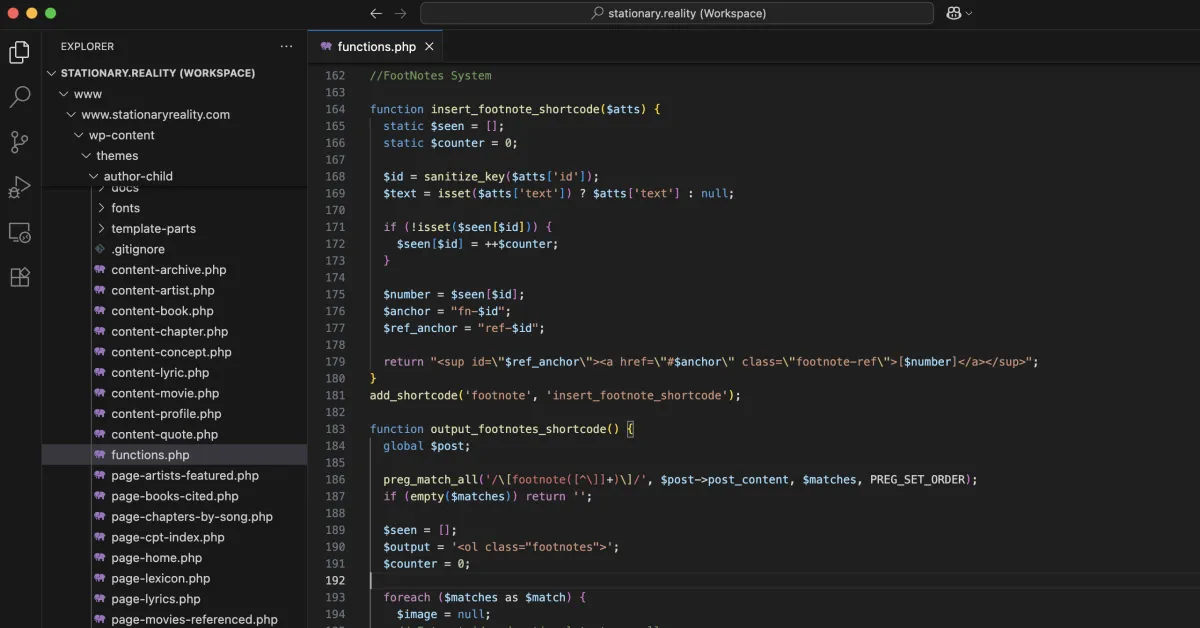
There are two shortcodes that power the whole system:
1. [footnote id="123"] — creates the little [1] number
It keeps track of how many footnotes have been used and inserts a superscript link pointing to the correct anchor.
return "<sup id=\"$ref_anchor\"><a href=\"#$anchor\">[$number]</a></sup>";
2. [footnotes] — collects everything at the bottom
This shortcode searches the current post for all [footnote id="..."] shortcodes, pulls info from each CPT (title, definition, source), and builds a list.
Each item also includes a back arrow:
<a href="#ref-123" class="backref">↩︎</a>
So users can jump back up to where the reference appeared.
🧠 Manual + Dynamic
The system works for both:
- Dynamic: Pulling CPT data via ACF (e.g. Book titles, Concept definitions)
- Manual: For things like Wikipedia, I use
[footnote id="wiki-1" text="Adapted from Wikipedia."]
It even supports cover images (like book thumbnails), linked titles, and optional source URLs. I added a CPT icon system so each reference shows something like:
John Taylor Gatto 📚
“Quote or definition here” [↩︎]
🎵 Referenced Songs
At the end of the list, I added a custom field called referenced_songs for each chapter. It’s a repeater where I can just paste “Artist – Song” entries for songs used in the chapter (aside from the featured one).
The code automatically adds:
Songs Referenced:
• Tom Petty – Learning to Fly
• Lord Huron – Ends of the Earth
✅ Why It Works
- It’s simple: just anchors, shortcodes, and basic PHP
- It’s flexible: works across any CPT
- It’s visual: pulls in ACF content, images, links, and types
- It’s portable: I don’t need a plugin to maintain it
🧱 Part of a Bigger System
This footnotes engine is now tied into every major CPT — and will grow as I build the Quote Library, final lyric CPTs, and artist profiles. It also lays the groundwork for automatic index pages, CPT-to-chapter references, and full semantic linking across the site.